Posts

Using Planning functions with Dynamically created members

Image
Creating members on the fly and Planning functions are no longer a new gig to boast about. In case you still need some hint, please click on above hyperlinks to navigate to Oracle guide to throw some light on them. How about we try to combine the two and come up with a unique requirement where we create a member of the fly and then use it with planning function ? Today I would like to talk about a similar scenario which was more of an attempt to use the planning function to get the start period of a scenario member and drive calculations by scenario start period rather than using substitution variables. This would enable same calculations being executed against multiple scenarios which may have different start periods. We can either have pre-created scenarios or give an option to create one on the fly. Let’s go with second option and be able to run some calculations on a newly created member via form. I created a scenario and enabled it for dynamic children. Cre...
Groovy Series 4: Playing with cell level formatting

Image
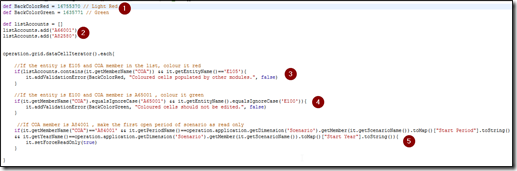
When it comes to highlighting certain data cells or making them read only, we all must have got our hands dirty with validation rules and valid intersections. Undoubtedly, they make things quite descriptive and help to control data entry when required. But at the same time, the trouble to maintain all these objects is equally troublesome. Lets consider three random scenarios which client must have proposed to highlight certain cells on a data form or make certain cells read-only If the entity is E105 and COA member is among ‘A66001’ or ‘A82580’, colour it red If the entity is E100 and COA member is A65001 , colour it green If COA member is A84001 , make the first open period of scenario as read only Considering the above requirements, if we intend to implement them, we would have to create validation rules to highlight the cells and create valid intersections to make specific cell read-only. W hat if, we have multiple calculating scenarios which run in isolation, say Plan scenario wher...

Groovy Series 3: Managing attributes via forms

Image
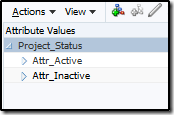
Attribute dimensions are a boon when it comes to tabbed reporting or running member specific calculations or filtering data based on attributes but their management is bigger pain. In case these attributes require a regular update or association to newly created member on the fly, the only option is to go into dimensions and update them. Sometimes these could be challenge when users are new to Planning and taking baby steps in administering the whole application. All they could expect is a webform where all members and their associated attributes are listed to review and update, if required. Today’s post is going to talk about how metadata management could be made easy for new to Planning (PBCS) administrators by leveraging groovy. In this example, we have a project dimension with hierarchies for existing and new projects. Each project is grouped into domestic or international project tracked by an attribute dimension – Project Category and to determine whether project should be consid...

Groovy Series 2: Privileged Methods

Image
“With great power comes great responsibility” is what Oracle wants to remind us by assigning certain methods in Groovy classes as privileged methods. Privileged methods restrict executing these methods in groovy rules unless user has administrator privileges. Privileged Methods: delete: Delete method in the Member Class. This method deletes the member and all its descendants from Planning outline saveMember: saveMember method in the Dimension Class. This method returns the member that was created based on the properties map defined for the member execute: execute method in DataMap Class. This method executes the already defined data map in the application So what happens if a user with non admin privileges attempt to execute any groovy rule using any of these three functions? Here’s an example where a non admin user tries to execute a rule with data map and receives following error. It’s obvious that these three functionalities should be controlled and hand...

Groovy Series 1: Groovy + PBCS = New possibilities !!!

Image
Groovy is the buzz word in Oracle EPM world and why shouldn’t it be. With the introduction of Groovy on EPBCS and PBCS+1 cloud options, it has made things so easy that everything seems to refreshed with Oracle EPM. On-premise version can also be enabled for Groovy, but it does not offer the groovy classes available on cloud. EPBCS is the E nterprise P lanning and B udgeting C loud S ervice while PBCS + 1 is the base PBCS service with at least one Oracle module enabled. This module could be either one of Financials, Project Financials, Workforce or Capex.  Having either one of these opens up the system to have groovy capabilities. Having capabilities to code in groovy programming language essentially makes PBCS a mini platform to play around with PBCS objects and anything with the data grid. Long back in the days of on-premise planning, we had the option to provide form validations using javascript which were replaced with data grid validation rules.  Now imagine, hav...

Dimension vs Smart lists - Part 1 - MRC approach

Image
It has been really a while that I posted anything. It was either work or arrival of a sweet angel into our lives, which kept me busy throughout this time. There have been many topics which I want to write about and probably my schedule will allow me to get back into motion. Let me give you a brief background about of this post. We were implementing a workforce and OPEX solution. The workforce module was an employee based model calculating salary, benefits, etc. and OPEX module had all expenses rolled up to give us P&L. The solution seems to be a usual one but things turned complex while we were almost half way through our implementation when the client brought in a new set of requirements. OPEX cube uses Entity and Location dimensions to track expenses while Workforce cube didn’t use Location dimension. It was after a while that client came back asking for the ability to track workforce expenses by locations. Being almost half way through the implementation, we had two option...

Executing .Bat files from Calc Manager

Image
Few days back, I had an opportunity to discuss on capability of Calc Manager to trigger .bat files. A fellow colleague of mine happen to have this requirement and had written a CDF to call a batch script. I was not convinced to write a CDF to perform such activity and believed to have some option using which we can avoid writing CDFs. Most of us have used Maxl and must be aware of the command ‘Shell’. This command triggers underlying operating system commands from within Maxl shell session. This is our easy way to do what we want. With the introduction of Calc Manager CDFs @CalcMgrExecuteEncryptMaxLFile and @CalcMgrExecuteMaxLEnScript , we now have ability to trigger Maxls from within Calc Manager. All we need to make sure is all such requests are sent to Essbase Server and bin folder under Essbase path is our starting point. Lets use Oracle sample application Vision and Calc Manager to test out. Create a batch file Test.bat . This file accepts a run time parameter and simply w...
