Posts

Showing posts with the label Groovy

Groovy Series 7: Submit Groovy generated rules to Essbase
Image
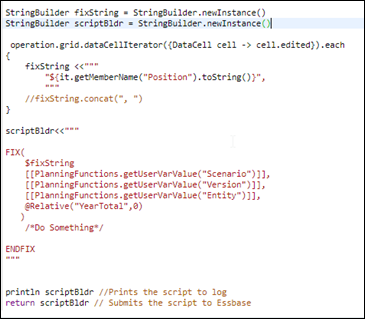
Ever since Groovy functionality was introduced with Planning cloud, it has evolved over a period of time, offering new capabilities and methods to achieve what was not possible with traditional Calc script rules. Sometime, I have been asked “Is Groovy a replacement for Essbase Calc scripts” and my answer is a big ‘NO’. Groovy should not be perceived as a replacement to Calc script, rather consider it a booster which enhances user experience and provides flexibility to dynamically generate Calc scripts and improves performance. Calc scripts are an integral part of how we run calculations on Essbase, whether we generate the code dynamically using Groovy or stick to traditional scripting. Lets look at different ways to submit these Calcs to Essbase and how Groovy has evolved. R eturn method This had been the oldest and default method until May 2019 when Job Factory class was introduced. Justifying its name, this method is used to submit a dynamically generated Calc script to Essbase for e...
Groovy Series 6: Beauty of cscParams

Image
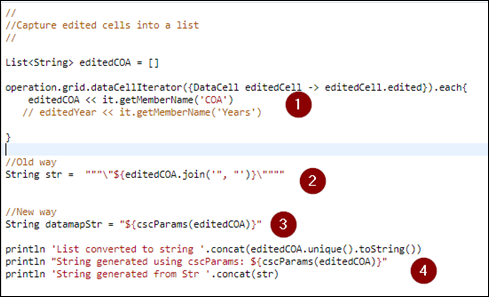
While working with Groovy scripts, a common task is to dynamically generate an Essbase calc script capturing the edited members from the grid. This script should then be submitted to Essbase for execution. But the important task is to ensure these edited members when passed on to the Calc script are written in required Essbase format, enclosed in quotes. In past we have been using various groovy methodologies to identify unique members and converting them to Essbase format concatenating with quotes, commas and spaces. How about if all of this can be done in one step my enclosing the entire collection in a method which spits out strings, enclosed in quotes and separated with commas ? Yes that’s what cscParams do for us. Let’s look at the above script example, in Step 1, I declare an empty list and push the edited accounts from the COA dimension into the list. Step 2 and 3 define two ways of converting this list into a string which I can use either dynamically generate a Calc script or p...

Groovy Series 5 : Interacting with external web services

Image
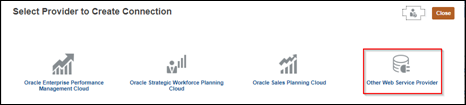
Though this feature came in last year and I have been a bit late in writing about, I thought it would be still worth making a record of the same to help me (and others if people are reading) to make use of the same. T he update to EPBCS (though it no longer is PBCS or EPBCS, let’s just stick to it to symbolise it as availability of Groovy) , Oracle had made its Groovy features more powerful by adding an ability to interact with external web services. What this means is, we can now do HTTP GET or POST with external webservices. If you like to know more about the methods, you can check W3School . In Groovy API, we have Get(), Post(), Delete() and Put(), which do majority of the tasks. A very basic example would be the ability to update FX rates into our application in an automated way. Usually this is one of the forecast preparation tasks for finance users to ensure FX rates are updated and they might be crunching these rates manually to put in an average or current value. I will be usin...

Groovy Series 4: Playing with cell level formatting

Image
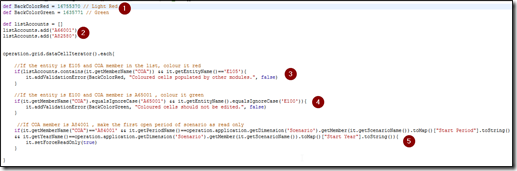
When it comes to highlighting certain data cells or making them read only, we all must have got our hands dirty with validation rules and valid intersections. Undoubtedly, they make things quite descriptive and help to control data entry when required. But at the same time, the trouble to maintain all these objects is equally troublesome. Lets consider three random scenarios which client must have proposed to highlight certain cells on a data form or make certain cells read-only If the entity is E105 and COA member is among ‘A66001’ or ‘A82580’, colour it red If the entity is E100 and COA member is A65001 , colour it green If COA member is A84001 , make the first open period of scenario as read only Considering the above requirements, if we intend to implement them, we would have to create validation rules to highlight the cells and create valid intersections to make specific cell read-only. W hat if, we have multiple calculating scenarios which run in isolation, say Plan scenario wher...

Groovy Series 3: Managing attributes via forms

Image
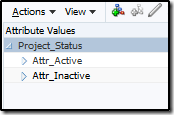
Attribute dimensions are a boon when it comes to tabbed reporting or running member specific calculations or filtering data based on attributes but their management is bigger pain. In case these attributes require a regular update or association to newly created member on the fly, the only option is to go into dimensions and update them. Sometimes these could be challenge when users are new to Planning and taking baby steps in administering the whole application. All they could expect is a webform where all members and their associated attributes are listed to review and update, if required. Today’s post is going to talk about how metadata management could be made easy for new to Planning (PBCS) administrators by leveraging groovy. In this example, we have a project dimension with hierarchies for existing and new projects. Each project is grouped into domestic or international project tracked by an attribute dimension – Project Category and to determine whether project should be consid...

Groovy Series 2: Privileged Methods

Image
“With great power comes great responsibility” is what Oracle wants to remind us by assigning certain methods in Groovy classes as privileged methods. Privileged methods restrict executing these methods in groovy rules unless user has administrator privileges. Privileged Methods: delete: Delete method in the Member Class. This method deletes the member and all its descendants from Planning outline saveMember: saveMember method in the Dimension Class. This method returns the member that was created based on the properties map defined for the member execute: execute method in DataMap Class. This method executes the already defined data map in the application So what happens if a user with non admin privileges attempt to execute any groovy rule using any of these three functions? Here’s an example where a non admin user tries to execute a rule with data map and receives following error. It’s obvious that these three functionalities should be controlled and hand...

Groovy Series 1: Groovy + PBCS = New possibilities !!!

Image
Groovy is the buzz word in Oracle EPM world and why shouldn’t it be. With the introduction of Groovy on EPBCS and PBCS+1 cloud options, it has made things so easy that everything seems to refreshed with Oracle EPM. On-premise version can also be enabled for Groovy, but it does not offer the groovy classes available on cloud. EPBCS is the E nterprise P lanning and B udgeting C loud S ervice while PBCS + 1 is the base PBCS service with at least one Oracle module enabled. This module could be either one of Financials, Project Financials, Workforce or Capex.  Having either one of these opens up the system to have groovy capabilities. Having capabilities to code in groovy programming language essentially makes PBCS a mini platform to play around with PBCS objects and anything with the data grid. Long back in the days of on-premise planning, we had the option to provide form validations using javascript which were replaced with data grid validation rules.  Now imagine, hav...